2026-01-02 · 5 min read
Choosing a Container Base Image Without Guessing
A current, measurement-first guide to Alpine, Debian slim, Distroless, and Bun container images.
The smallest container image is not automatically the safest or fastest one. A useful base image is the smallest image that still matches the application's runtime, native-library, debugging, and operational requirements.
This article previously included precise image sizes, pull times, vulnerability counts, and runtime comparisons without a reproducible build definition. I removed those numbers. Registry layers vary by architecture and tag, vulnerability counts change with scanner databases, and a runtime benchmark from one application does not transfer to another.
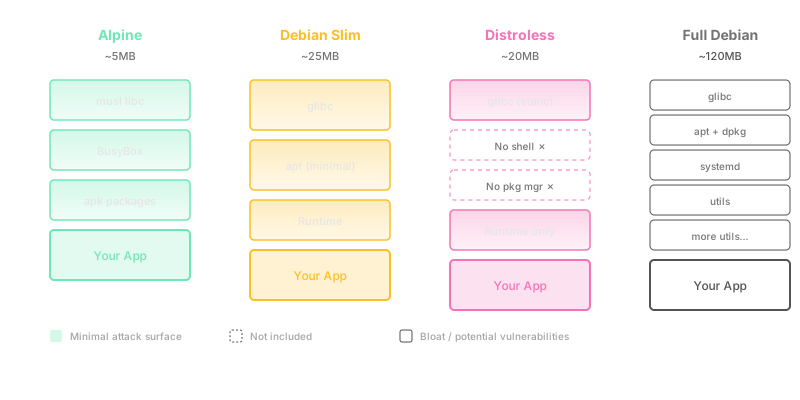
Start with the workload
Before choosing a tag, answer four questions:
- Does the application need glibc, musl, or statically linked output?
- Does it compile native dependencies during installation?
- How will an operator debug a failing container?
- Can the build and runtime use separate stages?
The answers usually narrow the choice more reliably than a size table.
Alpine Linux
Alpine uses musl libc and BusyBox. The current official 3.23 line is compact and works well for software that supports musl cleanly.
FROM alpine:3.23

RUN addgroup -S app && adduser -S -G app app
WORKDIR /app
COPY --chown=app:app ./server /app/server
USER app
ENTRYPOINT ["/app/server"]
Choose Alpine when:
- the binary is static or explicitly tested against musl;
- the dependency tree does not assume glibc behavior;
- you value a small general-purpose userland.
Do not choose it merely because the compressed base layer is small. Native Node or Python packages may need additional build tooling, and compatibility work can outweigh the bytes saved.
The current tags are published by the Docker Official Alpine image.
Debian slim
Debian slim is a practical default for applications whose dependencies expect glibc. For Node.js, the current LTS line is Node 24; the official image publishes node:24-bookworm-slim.
FROM node:24-bookworm-slim AS dependencies
WORKDIR /app
COPY package.json package-lock.json ./
RUN npm ci --omit=dev

FROM node:24-bookworm-slim AS runtime
ENV NODE_ENV=production
WORKDIR /app
COPY --from=dependencies /app/node_modules ./node_modules
COPY --chown=node:node . .
USER node
CMD ["node", "server.js"]
Choose slim when:
- native modules assume glibc;
- Debian packages are part of the runtime contract;
- operators need a familiar, if reduced, userland;
- compatibility matters more than the final tens of megabytes.
The supported tags and architectures are listed on the official Node image.
Distroless
Distroless removes the package manager and normal shell from the runtime image. As of July 2026, the project publishes Debian 13 images, including gcr.io/distroless/nodejs24-debian13 and gcr.io/distroless/static-debian13.
FROM node:24-bookworm-slim AS build
WORKDIR /app
COPY package.json package-lock.json ./
RUN npm ci
COPY . .
RUN npm run build && npm prune --omit=dev

FROM gcr.io/distroless/nodejs24-debian13:nonroot
WORKDIR /app
COPY --from=build --chown=nonroot:nonroot /app/dist ./dist
COPY --from=build --chown=nonroot:nonroot /app/node_modules ./node_modules
COPY --from=build --chown=nonroot:nonroot /app/package.json ./package.json
CMD ["dist/server.js"]
Distroless reduces what is available inside a compromised container, but it changes debugging. You need logs, metrics, traces, ephemeral debug containers, or the project's explicit :debug variants instead of assuming sh exists.
The Distroless repository documents supported images, architectures, non-root tags, and debug variants.
Bun images
Bun publishes Debian, slim, Alpine, and Distroless variants. The moving major tag oven/bun:1-alpine currently points at the Bun 1 line; production builds should pin a reviewed version or digest.
FROM oven/bun:1-alpine AS install
WORKDIR /app
COPY package.json bun.lock ./
RUN bun install --frozen-lockfile --production

FROM oven/bun:1-alpine
WORKDIR /app
COPY --from=install /app/node_modules ./node_modules
COPY . .
USER bun
CMD ["bun", "run", "server.ts"]
Use Bun when the application is already tested on Bun. Do not infer runtime speed from the base image. Measure the service's actual handlers, libraries, startup path, and memory use.
Current variants and compressed sizes are published on the official Bun image page.
Build and runtime should be different jobs
Docker's current guidance recommends multi-stage builds: compilers and package managers can live in a build stage while the final stage contains only the artifacts required to run.
# syntax=docker/dockerfile:1
FROM node:24-bookworm-slim AS build
WORKDIR /src
COPY package.json package-lock.json ./
RUN --mount=type=cache,target=/root/.npm npm ci
COPY . .
RUN npm run build

FROM node:24-bookworm-slim AS runtime
ENV NODE_ENV=production
WORKDIR /app
COPY package.json package-lock.json ./
RUN --mount=type=cache,target=/root/.npm npm ci --omit=dev
COPY --from=build /src/dist ./dist
USER node
CMD ["node", "dist/server.js"]
This design is easier to reason about than deleting build tools after they have already entered a layer.
Tags are not immutable
node:24-bookworm-slim can point to a newer image tomorrow. That is useful for receiving base-image fixes, but it means two builds can differ.
For an auditable release:
- select a maintained tag;
- resolve and pin its digest;
- let an update tool propose digest changes;
- rebuild regularly so security fixes actually enter the application image.
Docker's build best practices explain the trade-off between mutable tags, digest pinning, and automated remediation.
Measure your own images
A comparison is useful only when every candidate is built from the same commit on the same architecture.
Record:
image digest
platform and architecture
compressed transfer size
unpacked size
cold pull time on the same network
cold start time using the same health condition
steady-state memory
scanner name, database timestamp, and severity policy
Then test the cases that usually break:
- DNS and TLS certificates;
- time zones and locales;
- native modules;
- signal handling and graceful shutdown;
- non-root filesystem permissions;
- the production debugging path.
My default decision tree
- Start with Debian slim when compatibility is uncertain.
- Use Alpine when the workload is tested on musl and the smaller userland is useful.
- Use Distroless when the team already has strong external observability and a deliberate debug path.
- Use Bun images for applications that intentionally run and test on Bun.
- Use a multi-stage build in every case where compilation or dependency installation needs more tooling than runtime.
There is no universal winning base image. The right choice is the one whose compatibility, maintenance, attack surface, and measured deployment behavior fit the service.