2026-01-03 · 6 min read
A Jenkins Pipeline That Can Fail Safely
A practical Jenkins pipeline built around immutable artifacts, bounded credentials, explicit promotion, and rollback evidence.
A pipeline is not production-ready because it has build, test, and deploy stages. It is production-ready when a failed build cannot become a release, the same artifact moves through every environment, secrets stay bounded, and an operator can explain exactly what reached production.
This is the Jenkins shape I use for that problem.
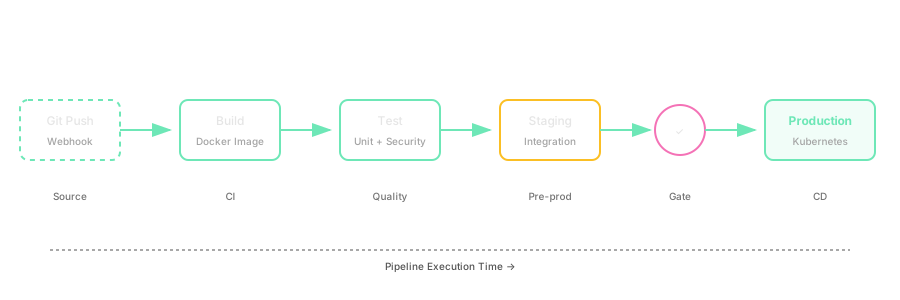
The invariants
Before writing the Jenkinsfile, define what the pipeline must never violate:
- A commit produces one immutable image digest.
- Tests and scans run against that artifact or its exact source commit.
- Staging and production receive the same digest.
- Production promotion is explicit and auditable.
- Credentials exist only inside the steps that need them.
- A rollout failure leaves enough evidence to recover or roll back.
These rules matter more than the number of stages.
Keep the Jenkinsfile in source control
Jenkins recommends defining Pipeline in a Jenkinsfile checked into source control. That gives the delivery path code review, history, and one source of truth alongside the application.
Declarative Pipeline is a good default because its stage and post-condition structure is intentionally constrained. Scripted Pipeline remains useful when the workflow truly needs arbitrary Groovy, but flexibility should solve a real problem rather than hide an unstructured deployment script.
The Jenkins Pipeline handbook documents both syntaxes and recommends Pipeline as code.
A practical pipeline
The example below builds one image, records its digest, runs verification, deploys the digest to staging, waits for approval, and promotes the same digest to production.
pipeline {
    agent none

    options {
        disableConcurrentBuilds(abortPrevious: true)
        timeout(time: 45, unit: 'MINUTES')
        timestamps()
        buildDiscarder(logRotator(numToKeepStr: '40'))
    }

    environment {
        REGISTRY = 'registry.example.com'
        IMAGE = 'platform/api'
    }

    stages {
        stage('Checkout') {
            agent { label 'linux' }
            steps {
                checkout scm
                script {
                    env.REVISION = sh(
                        script: 'git rev-parse --short=12 HEAD',
                        returnStdout: true
                    ).trim()
                }
                stash name: 'source', includes: '**', useDefaultExcludes: false
            }
        }

        stage('Test') {
            parallel {
                stage('Unit') {
                    agent { label 'linux' }
                    steps {
                        unstash 'source'
                        sh 'make test-unit'
                    }
                }
                stage('Static checks') {
                    agent { label 'linux' }
                    steps {
                        unstash 'source'
                        sh 'make lint'
                    }
                }
            }
        }

        stage('Build immutable image') {
            agent { label 'container-builder' }
            steps {
                unstash 'source'
                withCredentials([usernamePassword(
                    credentialsId: 'registry-push',
                    usernameVariable: 'REGISTRY_USER',
                    passwordVariable: 'REGISTRY_PASSWORD'
                )]) {
                    sh '''
                        set +x
                        printf '%s' "$REGISTRY_PASSWORD" | docker login "$REGISTRY" \
                          --username "$REGISTRY_USER" --password-stdin
                        docker build --pull \
                          --label org.opencontainers.image.revision="$REVISION" \
                          --tag "$REGISTRY/$IMAGE:$REVISION" .
                        docker push "$REGISTRY/$IMAGE:$REVISION"
                        docker inspect --format='{{index .RepoDigests 0}}' \
                          "$REGISTRY/$IMAGE:$REVISION" > image-digest.txt
                    '''
                }
                archiveArtifacts artifacts: 'image-digest.txt', fingerprint: true
                stash name: 'release-metadata', includes: 'image-digest.txt'
            }
        }

        stage('Verify image') {
            parallel {
                stage('Security scan') {
                    agent { label 'security-tools' }
                    steps {
                        unstash 'release-metadata'
                        sh 'trivy image --exit-code 1 --severity HIGH,CRITICAL "$(cat image-digest.txt)"'
                    }
                }
                stage('Integration') {
                    agent { label 'linux' }
                    steps {
                        unstash 'release-metadata'
                        sh './ci/integration-test.sh "$(cat image-digest.txt)"'
                    }
                }
            }
        }

        stage('Deploy staging') {
            agent { label 'deploy-tools' }
            steps {
                unstash 'release-metadata'
                withCredentials([file(credentialsId: 'staging-kubeconfig', variable: 'KUBECONFIG')]) {
                    sh './ci/deploy.sh staging "$(cat image-digest.txt)"'
                    sh 'kubectl rollout status deployment/api -n staging --timeout=5m'
                }
            }
        }

        stage('Promote production') {
            input {
                message 'Promote the verified digest to production?'
                ok 'Promote'
            }
            agent { label 'deploy-tools' }
            steps {
                unstash 'release-metadata'
                withCredentials([file(credentialsId: 'production-kubeconfig', variable: 'KUBECONFIG')]) {
                    sh './ci/deploy.sh production "$(cat image-digest.txt)"'
                    sh 'kubectl rollout status deployment/api -n production --timeout=8m'
                    sh './ci/smoke-test.sh production'
                }
            }
        }
    }

    post {
        always {
            junit allowEmptyResults: true, testResults: 'reports/**/*.xml'
            archiveArtifacts allowEmptyArchive: true, artifacts: 'reports/**'
        }
        failure {
            echo 'Release failed; inspect the stage result and archived evidence before retrying.'
        }
    }
}
The exact plugins and agents vary, but the control points should remain visible.
Build once, promote by digest
Rebuilding for production creates a second artifact. Even if the source commit is the same, package repositories, mutable base tags, and timestamps can change the output.
The build stage therefore publishes one image and records its immutable digest. Staging verification and production promotion both consume that digest.
The revision tag remains useful to humans. The digest is what proves identity.
Use short-lived agents
Jenkins can allocate different agents per stage. Kubernetes-backed agents are useful when a team already operates Kubernetes because each stage can receive a clean pod with an explicit container image and resource request.
That does not make the pod trusted by default. The service account, mounted secrets, network access, Docker socket, and node placement still define its real privilege.
The Jenkins Kubernetes plugin documents pod templates and dynamic agents.
Bound credentials to one step
Credentials should not be global environment variables for the entire build. Jenkins' withCredentials step narrows their lifetime and masks known values in logs.
Masking is not isolation. A malicious build running in the same scope can still read the environment. Sensitive deployment stages should run only for trusted branches, on appropriately isolated agents, with credentials limited to the destination and operation they need.
The Jenkinsfile credentials documentation covers supported credential bindings and their limitations.
Put policy before deployment
The verification stage should fail closed on the checks the organization actually treats as release policy:
- tests;
- artifact signature or provenance;
- vulnerability thresholds with an exception process;
- configuration validation;
- migration compatibility;
- integration behavior.
Do not add a scan that always prints warnings and never changes the result. That produces ceremony, not policy.
Approval is not a rollback strategy
A manual production gate proves that someone approved a digest. It does not make the deployment safe.
Before promotion, the service still needs:
- bounded rollout time;
- readiness and liveness behavior;
- a smoke test that exercises the real route;
- metrics and alerts for the new revision;
- a documented command or automated path to restore the last known-good digest.
For high-risk changes, use a progressive delivery controller or an explicit canary stage rather than teaching the Jenkinsfile to become a deployment platform.
Common failure modes
Mutable tags
Deploying latest makes the running artifact hard to identify and rollback hard to prove.
Shared workspaces
Reusing a dirty workspace lets one build contaminate another. Prefer ephemeral agents or aggressively controlled workspace cleanup.
Unbounded builds
A stuck test, input prompt, or rollout can occupy an executor indefinitely. Set pipeline and stage timeouts.
Secrets in shell tracing
Disable shell tracing around secret-consuming commands and pass secrets through stdin or files where the target tool supports it.
Parallel production deploys
Two builds racing to production make the final state depend on timing. Serialize or supersede deployments deliberately.
What to measure
Pipeline health is not only pass rate. Track:
- queue time before an agent starts;
- duration by stage;
- flaky-test retries;
- artifact build and pull time;
- deployment frequency;
- change failure rate;
- time to restore service after a failed release.
Those measurements reveal whether the bottleneck is compilation, agent capacity, unreliable tests, image distribution, approval latency, or the deployment itself.
Sources
- Jenkins Pipeline handbook
- Using a Jenkinsfile and handling credentials
- Jenkins Kubernetes plugin
- Docker build best practices
The useful pipeline is not the one with the most Groovy. It is the one that makes artifact identity, privilege, promotion, failure, and recovery obvious.